
Homey — A better smart home
Athom B.V.House & Home
4.263.00 Reviews
- Version
- 10.1.0
- Installs
- 100.00K
- Age Rating
- Everyone
Screenshots
Our Review of Homey — A better smart home
 Analysis by Appyee
I came to Homey — A better smart home looking for a calmer way to manage a mix of connected devices, rather than another screen full of separate brand apps. My overall impression is that it makes the most sense as a shared control point: it can bring compatible devices and routines together, so everyday actions need not involve jumping between several apps. That convenience is real, but it depends on what you own and how much time you want to spend setting things up.
What the free starting point gives you
Homey is a free house-and-home app from Athom B.V., with optional in-app purchases listed from $0.99 to $25.00 per item. I’d treat that as a useful distinction: you can begin without paying to download the app, while some purchases may cost extra. The listed price range does not tell me which purchase a particular household will need, so I wouldn’t assume that every setup is entirely free or that a paid option is necessary before trying it.
The app is rated for Everyone, and it has a 4.2 average from around 6,300 ratings. It has more than 100,000 installs, which suggests that it has found an audience beyond people who enjoy experimenting with smart-home gear. It first appeared on January 15, 2019, and the current version is 9.7.1; it requires Android 7.0 or later. Those details are useful if you’re checking an older phone before installing, but they don’t tell you whether your particular devices will work together.
For value, I’d start with a practical test rather than a shopping list: install it, check whether the devices you already use can be brought into one place, and see whether a routine saves you enough friction to matter. If your home has only one smart bulb and you’re happy with its maker’s app, a new control layer may add little. If you’re already switching between several compatible devices, the free entry point makes it easier to judge whether centralizing them is worthwhile.
Getting Started with Homey
First things first, setting up Homey is a breeze. You’ll want to download it from the App Store or Google Play, depending on your device. Once installed, the app guides you through the setup process like a friendly neighbor. You’ll create an account and start connecting your smart devices. The app supports a boatload of devices – everything from lights, thermostats, to your coffee maker. It’s like a universal remote for your home!
The Interface and User Experience
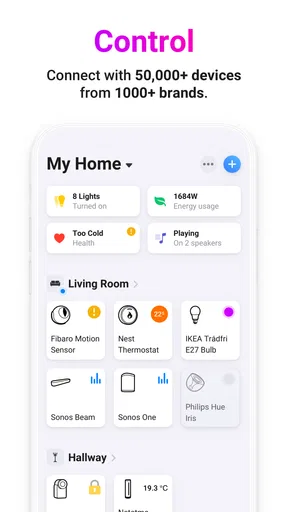
Once you’re in, the interface is clean and intuitive. You’ll find all your connected devices neatly organized. The app’s dashboard gives you a quick overview of what’s happening in your home, which is super handy. I love how you can customize the dashboard to show your favorite devices and scenes. It’s like having your own digital control center right at your fingertips.
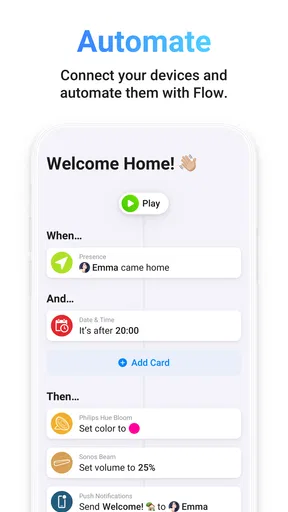
What really stands out is the app’s ability to create ‘Flows’. Think of Flows as recipes for your home. Want the lights to dim when you start a movie? Or maybe have the coffee maker start brewing when your morning alarm goes off? You can set it all up with a few taps. It’s automation made easy, and trust me, once you start creating Flows, you’ll wonder how you ever lived without them.
Compatibility and Integration
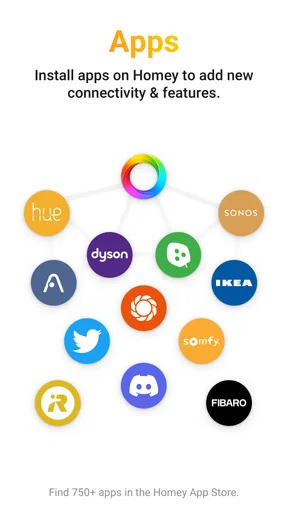
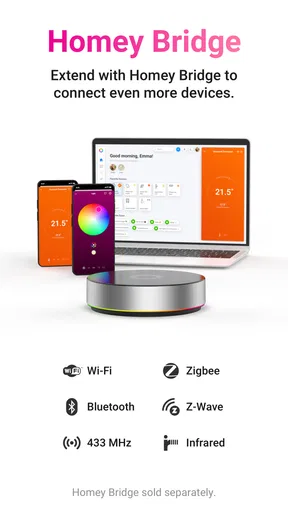
Now, let’s talk compatibility. Homey supports a wide range of protocols and brands, which is crucial when you’ve got a mix of smart devices from different manufacturers. Whether it’s Zigbee, Z-Wave, or even Bluetooth, this app has got you covered. It integrates seamlessly with popular brands like Philips Hue, Nest, and Sonos, to name a few. It’s like having a universal translator for all your smart gadgets.
One of my favorite features is the integration with voice assistants. If you’re like me and love using voice commands, you’ll be pleased to know that Homey works beautifully with Alexa, Google Assistant, and even Siri. Just say the word, and your home obeys!
Making routines useful rather than complicated
Flows are most valuable when they remove a repeated decision, not when they automate something just because they can. I’d begin with one small, predictable routine: for example, a movie-time Flow that dims the living-room lights, or a bedtime routine that turns off selected lights. Keep the first version narrow, test it at the time you’ll actually use it, and only then add more actions. That makes it easier to spot which step is responsible if the result is not what you expected.
A less obvious benefit of a central automation app is being able to think in terms of a situation instead of a device. Rather than opening a lighting app and then another control for sound, you can aim for a single scene that suits a particular moment. The trade-off is that a routine can become harder to understand as you add conditions and devices. I’d keep names plain and actions easy to remember, especially if other people in the home may need to use or adjust them.
It’s also worth planning for the times when a routine should not run. A morning action tied to an alarm, for instance, may be inconvenient on a day when your schedule changes. Before relying on any Flow for something important, I’d test both its normal behavior and the occasions when I want to control things manually. Automation should reduce small chores, not leave you wondering why a device acted on its own.
Everyday control and the limits of a single hub app
A realistic use case is arriving home with shopping in both hands. If your lights and other compatible devices are already connected, having a prepared scene can save several separate taps. Another is settling in for the evening: a chosen lighting setup can be easier to trigger than adjusting each bulb one by one. These are modest conveniences, but they’re the kind that make a smart-home setup feel worthwhile over time.
Compared with using each manufacturer’s app separately, Homey’s appeal is the possibility of bringing different devices and routines into a common place. The individual apps may still be preferable when you need a brand-specific adjustment or want to troubleshoot a device at its source. I see the two approaches as complementary rather than mutually exclusive: use Homey for the shared routine, and keep a maker’s app available for detailed control when needed.
There is also a difference between a broad compatibility claim and a guarantee that every model or feature will behave exactly as you expect. Before building a routine around a device, check that the specific product can be connected and that the control you care about is available. If your household depends on one particular advanced function, verify that first instead of assuming that basic connection means every feature will carry over.
Security and Privacy
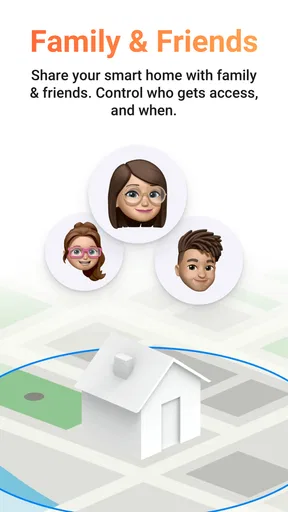
In the age of smart homes, security is a big deal. You don’t want just anyone accessing your devices, right? Homey takes this seriously. The app uses secure protocols to ensure your data stays private. Plus, you can set user permissions, which is great if you’ve got guests or kids who might be a little too curious.
For a shared home, I’d think through who needs which kind of access before inviting everyone into the setup. A household member who only needs to switch lights on may not need the same control as the person building Flows. Permissions are useful only if you take a moment to set them with your household in mind; they don’t replace sensible account care or a conversation about which routines are appropriate to change.
Support and Community
If you ever run into issues, the support team behind Homey is top-notch. They’re quick to respond and really helpful. Plus, there’s a thriving community of users who love sharing tips and tricks. It’s like being part of a big, friendly club where everyone’s obsessed with making their homes as smart as possible.
When something fails, I’d troubleshoot in a simple order: check whether the device still works in its own app, confirm that it remains connected to Homey, and then inspect the Flow that uses it. This separates a device problem from an automation problem and avoids rebuilding a routine unnecessarily. Community tips can help you discover ways other people organize their homes, but I’d still test any suggested setup with your own devices before depending on it.
Who benefits most, and who should look elsewhere
I’d recommend giving Homey a try if your home already contains a mix of compatible smart devices and you want routines that cross device or brand boundaries. It is especially appealing to someone who enjoys setting up a home once and then letting small, repeatable actions happen with less tapping. The current version is 9.7.1, and the app is available to Android users on version 7.0 or later; iPhone users can find it through the App Store.
I’d be more cautious if you only want the simplest possible control for one product, dislike account-based setup, or don’t want to spend time checking compatibility and refining routines. In those cases, the manufacturer’s own app may be more direct. And if your devices don’t support the connections or controls you need, a central dashboard cannot make that mismatch disappear. The most useful first question is not “Can this app control everything?” but “Can it handle the few devices and actions I actually care about?”
Final Thoughts
So, is Homey — A better smart home worth your time? Absolutely! Whether you’re just dipping your toes into the world of smart homes or you’re a seasoned pro, this app has something for everyone. It’s user-friendly, incredibly versatile, and just plain fun to use. So go ahead, give it a whirl and turn your home into the smart haven you’ve always dreamed of.
Oh, and don’t forget to check out the download links right here on our site. Your smarter home awaits!
My buy-or-skip verdict
I’d start with the free app if I already owned compatible devices, then judge it by whether a small number of Flows genuinely improve daily routines. The optional purchases mean it is sensible to check what you’re paying for before buying anything, rather than treating every feature as included or assuming an upgrade is required. For a mixed-device home, the chance to centralize everyday control is a persuasive reason to try it. For a single-device setup, or one that needs a feature its device connection doesn’t support, I’d stick with the simpler alternative.
Verdict
Strengths of Homey — A better smart home
- User-friendly interface simplifies setup
- Supports a wide range of smart devices
- Custom automation for personalized control
- Voice control compatibility enhances accessibility
- Regular updates improve functionality
Limitations of Homey — A better smart home
- Initial setup can be time-consuming
- Some advanced features need subscription
- Limited customer support options
- Occasional connectivity issues
- App size may be large for older devices
Similar Picks in This Category
View All
Universal TV Remote Control
CodeMatics Media Solutions3.9

AlfredCamera Home Security app
Alfred Systems Inc.4.7

Planner 5D: AI Home Design
Planner 5D4.5

Universal Tv Remote-Cast to TV
One Music Player4.1

Zillow: Homes for Sale & Rent
Zillow Group4.8

99acres Buy/Rent/Sell Property
infoedge.com4.3
Frequently Asked Questions
What is Homey, and how does it enhance my smart home experience?
Homey is an all-in-one smart home solution that connects various smart devices onto a single platform, allowing seamless control and automation. By integrating different brands and technologies, Homey enhances convenience by enabling you to create customized routines and scenarios, ensuring that your smart home devices work together harmoniously.
Does Homey support all my smart devices and systems?
Homey supports a wide range of smart devices across different brands, including Philips Hue, Sonos, Nest, and many more. Its compatibility extends to various protocols such as Z-Wave, Zigbee, Wi-Fi, and Bluetooth, making it highly versatile. However, it's recommended to check their website for the most updated list of supported devices.
How easy is it to set up and use Homey?
Setting up Homey is designed to be user-friendly, requiring minimal technical knowledge. The app provides step-by-step instructions to connect your devices, and the intuitive interface makes it simple to create automations and manage your smart home. Most users find it straightforward, although some complex setups might require additional tweaking.
Is Homey secure and private?
Homey prioritizes user security and privacy by implementing end-to-end encryption and secure data storage practices. It gives users control over their data, ensuring that personal information is not shared without consent. Regular updates and security patches further enhance the protection of your smart home environment.
What kind of customer support does Homey offer?
Homey provides comprehensive customer support through various channels, including an extensive online knowledge base, community forums, and direct support via email. They also offer troubleshooting guides and FAQs to help users resolve common issues. For more personalized assistance, contacting their support team is recommended.
